I’ve always been a bit unhappy with most (all?) of the queries you find when searching for “Oracle unindexed foreign keys query” on Google. Certainly, the ones that don’t use listagg to aggregate the constraint columns and the index columns are insane. I realize those queries might have been around since before listagg was available, but listagg was introduced in 11gR2 which was released in 2009.
To that end, the following 33 line query will find all the possibly unindexed foreign key constraints in your database. Since the matching happens on the column names, if you have a difference in column names between the constraint columns and the index columns, you won’t get a match and it will show up in the results as ‘Could be missing’. 99.99 times out of a hundred the index is missing.
I’ve also added the number of rows and last analyzed date from DBA_TABLES (remember, this number of rows may not be accurate as the value is only updated when the table is analyzed) so that the biggest possible offenders would be the first results. Even if the number of rows is small and the statistics are up to date, you’ll pretty much always want to have that foreign key index to eliminate over-locking the detail rows when a master row is updated. In all my years I’ve yet to run across a business application where the ‘index caused too much overhead’ and needed to be removed. I’m not saying those situations don’t exist, but they are exceedingly rare.
If you want to see how Oracle is doing with its schemas, you could change the owner_exclusion_list CTE (Common Table Expression, sometimes called a WITH clause) to something like “select ‘nobody’ from dual’). Right now that CTE gets the list of schemas that are Oracle maintained and adds in the ORDS_METADA and ORDS_PUBLIC_USER schemas which are, for some reason, not marked as Oracle maintained.
Using an APEX page to display the results of the query also allows me to format the last analyzed date using APEX’s “since” formatting, which gives a really good indication of possible stale statistics.
     with owner_exclusion_list as (          select username from dba_users where oracle_maintained ='Y'
                                   union all select 'ORDS_METADATA' from dual
                                   union all select 'ORDS_PUBLIC_USER' from dual )
        , constraint_columns as ( select owner
                                       , table_name
                                       , constraint_name
                                       , listagg(column_name, ', ') within group(order by position) as constraint_column_list
                                    from dba_cons_columns
                                    join dba_constraints using (owner, table_name, constraint_name)
                                   where constraint_type = 'R' -- R = Referential Foreign Key Constraint
                                     and owner not in (select * from owner_exclusion_list)
                                group by owner, table_name, constraint_name )
        , index_columns as ( select index_owner as owner
                                  , table_name
                                  , index_name
                                  , listagg(column_name, ', ') within group(order by column_position) as index_column_list
                               from dba_ind_columns
                              where index_owner not in (select * from owner_exclusion_list)
                           group by index_owner, table_name, index_name )
   select decode(ic.table_name, null, 'Could be missing'
                                    , 'Exists'          )              as foreign_key_index
        , to_char(dbat.num_rows, '999,999,999,999,999,999')            as last_analyzed_row_count
        , dbat.last_analyzed
        , cc.owner
        , cc.table_name
        , constraint_name                                              as foreign_key_constraint_name
        , constraint_column_list                                       as foreign_key_column_list
        , coalesce(index_name, '*** Possible Missing Index ***')       as index_name
        , coalesce(index_column_list,'*** Possible Missing Index ***') as index_column_list
     from constraint_columns cc
     join dba_tables dbat on ( dbat.owner = cc.owner and dbat.table_name = cc.table_name)
left join index_columns ic on (    cc.owner = ic.owner and cc.table_name = ic.table_name
                               and ic.index_column_list like cc.constraint_column_list || '%' )
 order by dbat.num_rows desc nulls last, cc.owner, cc.table_name, constraint_column_list;
Let me know if this query is helpful, and happy DBAing/Developing!
Note: On my Twitter post about this blog, I took a screenshot and put in the alt text for the image with the username column in the first CTE as ‘username’ instead of just username. This means that the Oracle maintained schemas are NOT excluded anymore. I was testing on a database that only had a single schema and wanted to include the Oracle schemas too. I also left off the owner column for the list in the final query.
2024-02 Update: As my friend Anton Nielsen pointed out, not everybody has DBA privs… If you don’t, just do a search and replace of “dba_” with “all_”. Then you can run this as a non-privileged user and you’ll be sure to capture missing indexes in your own schema and any other schema you can see.
I’ve been back for a while but thought I’d post some plans for my Kscope content and talk about the conference itself now that it’s in the bag.
I arrived late Friday night and things were pretty quiet. I spent some time in the bar trying various bourbons and whiskeys before calling it an early night.
The next morning I ran into Connor McDonald (check out his amazing content on Youtube). He mentioned that he was planning to go visit the famous Tom Kyte (the original creator of Ask TOM, and author of one of the very best Oracle books, Expert Oracle Database Architecture) but apparently Tom fell off a ladder and broke some ribs. Hopefully, Tom will recover soon. A bit later I joined the team going to the community service day event. They gave us matching shirts to wear and we boarded buses to Mile High Behavioral Healthcare and did a bunch of cleaning, gardening, and painting. I was on the painting crew and painted a gazebo and a few tables with a great team of folks. I ended up buying MHBH some picnic tables after we went to pick up one of their existing picnic tables and it essentially disintegrated. When one of the guests of MHBH asked me “How do I get one of those shirts?” I gave him mine. While the shirt was cool I’m sure he’ll get more use out of it than I would have.
By Sunday the rest of the Insum team had started to show up and we had a great time re-connecting.
Both of my main presentations were on Monday. Thankfully I’d delivered both before, so I was really comfortable with the content although it was going to be my first time delivering my “You know you might have a bad data model when…” presentation in just thirty minutes (I’d been given one of the 30 minute sessions for this presentation). It’s a bunch of slides with the type of queries that you would either see in your applications or queries you can run against your application schemas to see if there might be opportunities for enhancements. Upon the advice of Steven Feuerstein, another member of the Insum team, instead of starting with the theory of normalization, I started with the actual queries. Since the theory portion would take about 5 minutes, my plan was to cut it off at 25 minutes and jump to the theory. I set an alarm on my phone for 25 minutes, let the audience know what I planned to do, and dove in. When I finished my queries section, I glanced at my watch to see how much time I had left. As I was glancing at my watch, the alarm on my phone went off! It was perfect and I got a bit of applause from the audience. I finished off the theory portion and then got a lot of good feedback including from some of the very experienced folks in the audience (Oracle ACE directors, etc.).
Later in the day, I did my “APEX and ORDS for DBAs and System Admins” presentation. While I’ve delivered the content at other events before, I always update my presentations to the latest and greatest software, and with the very frequent updates of both ORDS and APEX I had to update everything a few days before the conference.
This presentation is actually about 2 to 4 hours of content, but I only had an hour to deliver it. Basically, I cut the presentation in half and gave folks a preview of what would be in the 2nd half if I had more time. I also went through the first half of the presentation pretty quickly. The premise of the presentation is that people often come to Kscope and they see all these really cool APEX solutions, but then when they go back to their own IT department the DBA or System Admin just says “No.” The reason for the “No” can be anything they feel like coming up with at the time (“Security”, “Too complicated”, “I don’t know how to do it”, etc.) but the conference attendee doesn’t get the very cool APEX and/or ORDS features that they saw at the conference. To solve this problem, I broke the first half of the presentation into three sections.
Install the APEX database component and patch it in the database. This section shows that APEX is just a component of the database (it shows up in the dba_registry view) and, by showing what is happening in the database we see that there are NO security changes in the database when you do this. It also showed how the installation and patch take under 10 minutes. On my boxes, the APEX install takes usually takes under six minutes and the patch takes under 30 seconds.
Now that you have the APEX component in the database, you have access to bunches of very cool APIs. Some of those APIs enable you to reach out of the database to access things on remote servers if the DBAs allow it. I show exactly how to enable this and how to create and manage an Oracle TLS wallet (yes, people and Oracle often refer to this as an SSL wallet, but we really stopped using SSL back in the 1990s. It’s been TLS for over 20 years… and it really is a TLS wallet). Wallet management can be very tricky and I can’t tell you the number of times I’ve seen very bad wallet setups on Oracle servers. I explain the various wallet types (TDE wallet, SEPS wallet, XDB wallet, and TLS wallet) and show how I build and maintain them.
Finally, we get to the last step which is setting up and configuring ORDS for a production-ready deployment. While Kris Rice, the Oracle lead for the ORDS team, disagrees with me, I really don’t like deploying ORDS with /ords/ in the URL. As Sir Tim Berner’s Lee explains, cool URLs don’t have the technology used to deploy them in the URL. Yes, that link is from 1998. I figure when Kris is knighted by the King he can tell me I’m wrong. I also show how to maintain ORDS over time. I show how to create the best
At this point, I’ve covered the first half of the presentation but an hour has passed and I have to just show folks what the next three sections are:
Adding a database resource manager plan that ‘just works’ for APEX deployments.
Building a Systemd service to run ORDS.
Deploying the ORDS service as a ‘regular’ operating system user instead of the root user. The root user can, of course, deploy ORDS on port 443 (the default HTTPS port) trivially, but some folks would prefer not to run ORDS as root, so I show how to do this.
My plan is to take all of that content and publish it here (update: The entire 2-hour APEX & ORDS for DBAs and System Admins is now live!), but it will take a while. Life is very busy and I’m not exactly sure when I’ll be able to finish it all. Until then, all of the code and examples from my both presentations can be found in the following Github repos:
Finally, I was a co-presenter with Cary Milsap of Method R in a presentation on tracing APEX. It was also well-received and sparked a lot of interesting discussions.
select value as character_set
  from nls_database_parameters
 where parameter = 'NLS_CHARACTERSET';

CHARACTER_SET
________________
AL32UTF8
If you see anything other than AL32UTF8 as the answer to the above query, then you should be building a plan to get from whatever character set your database is currently running to Unicode (AL32UTF8). While this can seem daunting, Oracle actually provides a great tool to assist with the process called the Oracle Database Migration Assistant for Unicode (DMU).
DMU will show you if your database will have any issues when you migrate from your legacy character set to Unicode. As you can see from the splash screen above “Oracle recommends using Unicode as the database character set for maximum compatibility and extensibility“. Oracle strongly suggests that all new databases should be created using AL32UTF8 and that legacy databases created in the past should be migrated to AL32UTF8.
A great time to think about a character set upgrade is during a database upgrade. If you are planning on a 19c upgrade (and we should really be there already today, but, of course, “should” and “are” are two different words for a reason) or potentially even 23c when Oracle releases it soon, and your current character set isn’t AL32UTF8 then now is the time to plan the migration!
Here’s a real-life DMU story:
A customer of mine had a database that had been created on Solaris in the late ’80s and they had used whatever the default character set was at the time, which is really what everyone was doing back then. In 2013 we decided to upgrade the database to 12.1 and change the character set during the upgrade. The fear was that this was going to be a big problem and we came up with all kinds of plans on how to fix the various issues (data cleansing, adjusting column widths on tables, etc.) However, after talking about all the potential issues, we actually ran the DMU and it showed us that the problem was much smaller than we thought. We only had about 30 rows of data that could have an issue during the migration!
After checking with the business, we just went into the 30 rows and cleaned up the data. A few “do not”s got changed to “don’t”, saving a single character which was all we needed.
Today, I talk to folks about using DMU to check their databases before they decide that “the problem is too big”. DMU will sometimes show that the problem either doesn’t exist, or it’s very small.
As an aside:
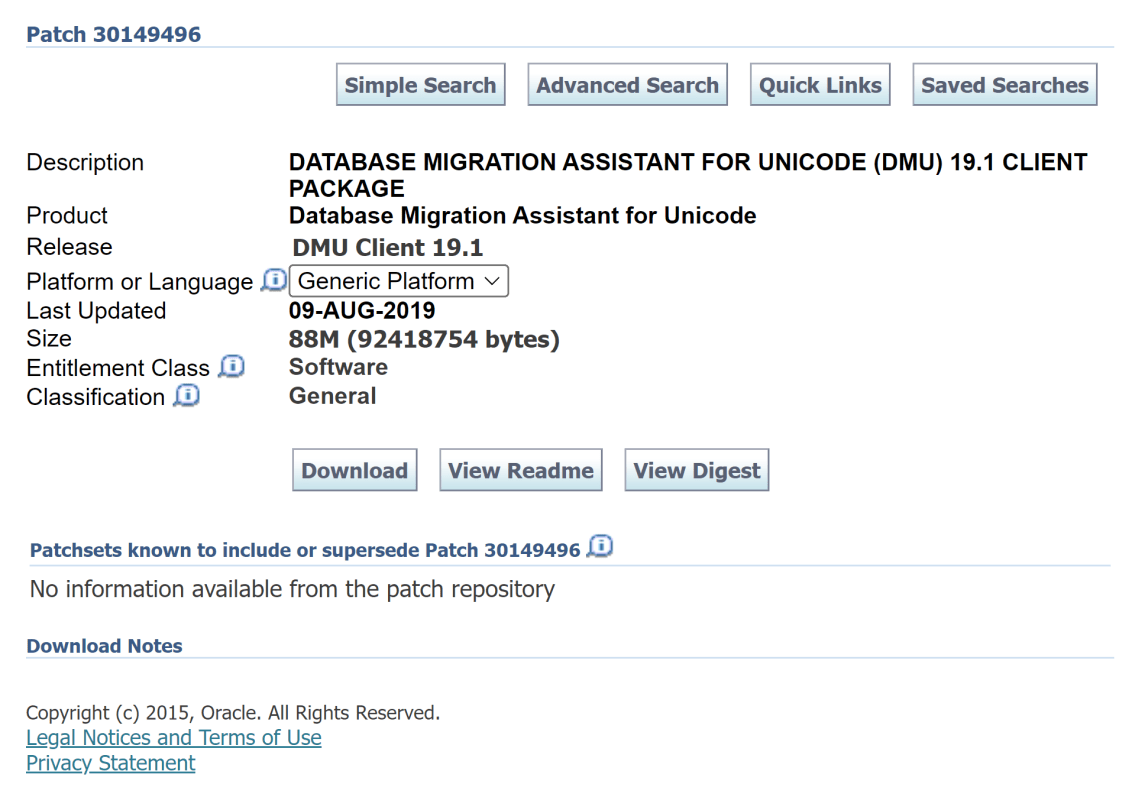
Today I did an install of DMU on a server using the download of DMU from Oracle Support. After extracting the zip file on my Oracle Linux box into /opt/oracle/dmu, I noticed that the dmu.sh script was read-only. A simple chmod u+x on the dmu.sh script enabled me to start it up without any issues.
[oracle@databaseserver DB:dbacon /opt/oracle/dmu]
$ ./dmu.sh
-bash: ./dmu.sh: Permission denied

[oracle@databaseserver DB:dbacon /opt/oracle/dmu]
$ chmod u+x dmu.sh

[oracle@databaseserver DB:dbacon /opt/oracle/dmu]
$ ./dmu.sh

   Database Migration Assistant for Unicode
 Copyright (c) 2011, 2019, Oracle and/or its affiliates. All rights reserved.
After watching a client move a file from their Linux database server down to their Windows box and then use their browser to upload the file to Oracle Support, I remembered that there was a more efficient way to do this. I was confident that I had this post in my blog already, but lo and behold, I hadn’t.
So today I fix that:
Let’s say you have an SR number 3-111222333444 and you need to upload a big zip file name zipfile.zip and you use email@blah.com to log into Oracle Support. The below command will get the file directly from your Linux box to Oracle Support.
Today I was doing some tricky remote troubleshooting of an ORDS deployment. It turned out that it was the networking team doing fun stuff with the removal of cookies from only one of the multiple load-balanced devices between the users and the ORDS server (99% sure of this, we’ll see later if I was right). Since this stuff can be almost impossible to figure out without sniffing packets and/or visibility into the whole network configuration, a good trick to remember is to just deploy ORDS standalone on the desktop of the user attempting to troubleshoot things. If it works on their desktop, then it’s almost certainly the networking team doing something funny between the users and the application servers.
During the whole troubleshooting session, where the DBA was typing in all the commands as I dictated them (so much fun!), the DBA was constantly typing pwd. This post is for that DBA.
I’ve added the following line to my .bash_profile on all my Oracle database servers:
PS1 is the environment variable that controls what your prompt looks like.
Mine has the following:
\n = a new line. This means that all of my commands have some nice whitespace (although I use green on black, so is that blackspace?) between them.
[ = the starting bracket for my prompt.
\u@\h = username@hostname
DB:$( echo $ORACLE_SID ) = Each time a new prompt is generated, find the value of the $ORACLE_HOME environment variable and display it with a DB: in front of it. It took me a bit to figure out how to get this to evaluate every time a new prompt was drawn. For my middleware servers, I leave this portion off. I suppose if your middleware server talks to only a single database, you could just hardcode it into the prompt.
\t = the current time
\w = the current working directory. No more typing pwd every other command!
] = the ending bracket for my prompt.
\n = another new line. This allows your actual command prompt to always start on the left side of the screen instead of constantly moving across the screen as you navigate down directory paths.
\$ = print the normal prompt. Notice that there is a space before the closing ‘ so that commands are not jammed up against the prompt.
Hopefully, an Oracle DBA or two out there finds this useful!
The default display for the database for date columns is often DD-MON-RR. So Januray 1st, 2021 would display as 01-JAN-21. This is horrible. The time portion of the date is missing from the display (an Oracle date is always composed of at least the century, year, month, day, hour, minute, and second) and the RR format will lead to issues in 2050 which isn’t that far away.
To get your Oracle tools (like sqlplus and rman for example) on your Unix/Linux server to show dates in a better format, the following will help.
One of my customers is deploying a new driver for their VMWare Cluster SAN next week. The last time they did this (about a year ago), there were random disk corruptions on the database servers. Needless to say, this was bad.
This time the VMWare team is going to be on the lookout for corruption, but the database team wanted to also do an extra check and run an rman validate command on the “datafiles with the most write activity”.
The following query will give you a list of tablespaces with write activity over the last hour with the highest write activity.
  select tablespace_name
       , sum(physical_block_writes) as total_last_hour_block_writes
    from v$filemetric_history
    join dba_data_files using (file_id)
group by tablespace_name
  having sum(physical_block_writes) > 0
order by sum(physical_block_writes) desc;
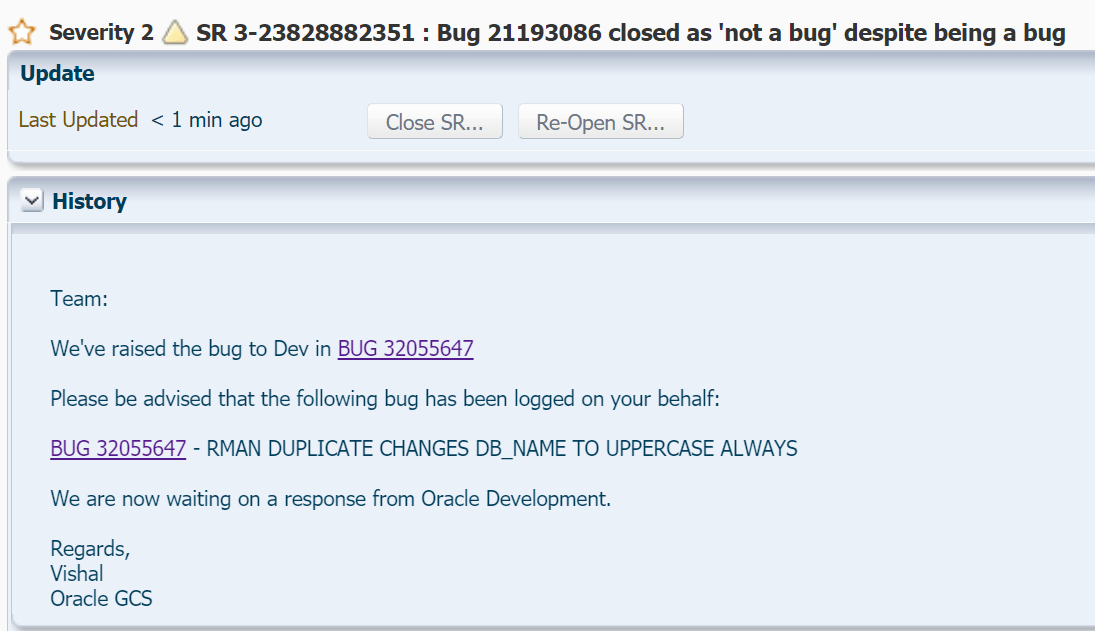
I’ve been working with RMAN for quite a while and one thing that has always annoyed me is if you create a database using the RMAN duplicate command, it will always change your DB_NAME to uppercase. Someone logged a bug against this a long time ago and it was closed as ‘not a bug’ because “Doc ID: 2050095.1 Due to many dependencies, RMAN needs to convert DB_NAME and DB_UNIQUE_NAME to UPPER case. This is confirmed by development via Bug 21193086 closed as ‘not a bug’.”
A while ago, during a marathon RMAN duplicate session with a customer, I decided to go ahead and raise the bug again.
I filed the SR above and included the following:
While closed as ‘not a bug’, it most definitely is a bug. There are MANY ramifications of this including scripts, database directory objects (/u01/app/oracle/admin/orcl/dpdump becomes /u01/app/oracle/admin/ORCL/dpdump for example), wallet locations, etc.
Just because whoever wrote this code way back when made a few mistakes doesn’t mean that this isn’t a bug. It is a bug. You are taking a duplicate (clone operation) and arbitrarily changing things that shouldn’t be changed. I spend 14.5 years at Oracle including 5.5 years in development. Far too often there was a joke about “I just status 32’d the issue. If they really care, they’ll raise it again.”
There can’t really be ‘many dependencies’ since this only happens in the very final stage of an RMAN duplicate.
Consider this the “it was raised again”.
After quite a while (and I do mean quite a while) the support team raised my bug with the Oracle development team.
I’m really hoping that the development team comes up with a better solution than they did for the old bug. While you need a support contract to see the solution in Doc ID 2050095.1, if you imagined a scenerio where Oracle said “Deal with it”, you wouldn’t be far off from their current ‘solution’.
I asked Oracle to publish the bug, and they have… Here’s to hoping this gets addressed.
Today I finished off a project where I migrated a database from a non-container 12.1.0.2 database to a pluggable 19.9 database. The final step: run noncdb_to_pdb.sql.
I’ve been using SQLcl without any issues, but for some reason SQLcl (20.2, the latest version) produced an error where SQL Plus didn’t!
SYS@CDB$ROOT AS SYSDBA> STORE SET ncdb2pdb.settings.sql REPLACE
 SP2-0603: Illegal STORE command
 Usage: STORE {SET} filename[.ext] [CRE[ATE]|REP[LACE]|APP[END]]
SQL Plus on the other hand ran the same command just fine:
SYS@aurdcon AS SYSDBA> STORE SET ncdb2pdb.settings.sql REPLACE
 Wrote file ncdb2pdb.settings.sql
Oracle backup terminology can be kind of confusing. And, by can be, I mean that it is confusing. There are lots of different terms that sound similar but mean very different things. I’ve seen very experienced DBAs use the following statements synonymously: “I just did a whole backup” and “I just did a full backup”. The correct response to “I just did a whole backup.” is “Thanks! I appreciate it.”, while the correct response to “I just did a full backup.” is “Of what?” or maybe even “Why?”. Because, according to Oracle’s terminology, those two statements mean quite different things.
I’ll be defining the terminology that Oracle uses in their training material and documentation and, in addition, making suggestions on what your backups should most often look like.
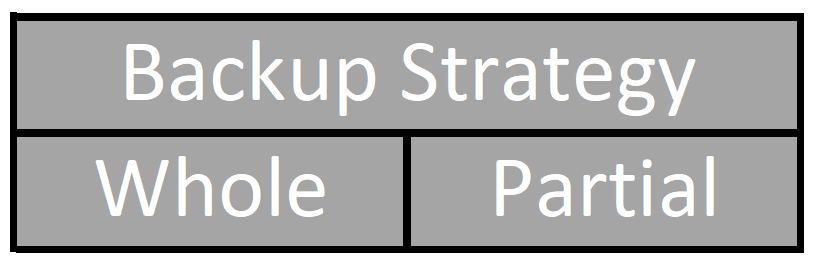
Backup Strategy – Whole or Partial
Every Oracle backup is either a whole backup or a partial backup.
A whole backup in Oracle terminology means that you’ve backed up all data in all datafiles and at least one control file. Since the control files (you have configured multiple control files, right?) are copies of each other, you technically only have to backup a single control file.
So what is a partial backup? It’s a backup that isn’t all data in all datafiles and a control file, but instead less than that. If you backup a single datafile, you’ve done a partial backup. If you backup all datafiles but one, you’ve done a partial backup. If you backup all data in every single data file, but don’t back up at least one control file, you’ve done a partial backup.
Backup strategy tells you how much of your database you are backing up. You are either backing up all data in all datafiles and at least one control file, or you are backing up something different than that.
For your backup strategy you should start with a whole backup of your database. After that initial backup you can either do partials forever using the Oracle Suggested Backup Strategy , or you can bounce back and forth between whole and partial backups. To me, the least effective backup strategy is to always do whole backups, but some folks do use this strategy. I much prefer to start with a whole backup and then do partial backups from then on using the Oracle Suggested Backup Strategy.
As an aside, notice that a whole backup doesn’t technically need an spfile to be included in the backup, but I always include an spfile in all my whole backups.
Backup Type – Full or Incremental
The next term that Oracle uses to describe a backup is Backup Type. Every backup is either a Full Backup or an Incremental Backup.
And… Welcome to the start of the confusion! Whole does not equal Full. While you can do a whole full backup, you can also do a partial full backup.
Backup type tells you how the backup can be usedrelative to other backups. Generally, a full backup stands on it’s own and isn’t used in conjunction with other backups. A full backup backs up all the data in whatever you are backing up. An incremental backup canbe used with other incremental backups and, depending on it’s level (which I’ll explain in a moment) either backs up all the data in whatever you are backing up, or all the data that has changed since your previous incremental backup.
To further increase backup type complexity, incremental backups have different types themselves. Incremental backups are either a Level 0 backup or a Level 1 backup. And, to make backup types even more confusing, Level 1 backups are also of different types! Incremental Level 1 backups are either Cumulative or Differential backups.
Let’s start with a Level 0 backup. A Level 0 backup is identical to a full backup in that it contains all of the data in whatever you are backing up (remember, it could be either a whole or partial backup that you are doing), but it has one additional property: It can be used as the base backup for later incremental level 1 backups.
A Level 1 backup contains only data that has changed since a previous backup. Which previous backup? Well, it depends on the incremental Level 1 backup type. If it is an incremental Level 1 Cumulative backup, then it will always contain the changes since the last Level 0 backup. An incremental Level 1 Differential backup, on the other hand, will contain the changes since the previous incremental backup whether it was a Level 0, Level 1 Cumulative, or Level 1 Differential.
One might ask: Why do we have these two different Level 1 backup types?
It’s basically a balance between the size and speed of the backup (the first differential or cumulative backup taken after a level 0 backup are the same, but, generally subsequent differentials should be faster and smaller than subsequent cumulative backups), and the time to recover datafiles past the level 0 restore point. A recover process of a single cumulative backup should be faster than recovering 6 differential backups. However, if you have almost all add operations, then the difference could be negligible. If you have many update operations, then the difference could be significant.
These days we don’t really have to worry about this so much. Most of the time, we just do differential backups when we do level 1 backups because the files that make up the backup are usually located in one place instead of separate physical tapes and we don’t have to mount and unmount tape drives any more, or if we do, the capacity is massive compared to the early days of computing and we are not bouncing from tape to tape like we did in the past.
For backup types, I always start with an incremental level 0 backup. In general, I don’t usually do full backups. Since an incremental level 0 is nothing more than a more flexible full backup, a whole incremental level 0 is usually the way to go for a base backup. Once that is completed, I usually follow that up with incremental level 1 differential backups and then move my level 0 backup forward in time by applying previous level 1 incremental backups to the level 0 backup, effectively moving the level 0 backup forward in time.
Backup File Type – Image Copy or Backup Set
So… Here’s another source of confusion. Backups generate output files, and there are two different types of output files: Image Copies or Backup Sets.
An image copy (which RMAN, the tool Oracle supplies to manage and use database backups, just shortens to COPY) is an exact bit for bit duplicate of the file. It includes all used and unused space in the file. So, if you’ve created a 1 TB datafile and only have 10 MB of data in it and you create an image copy backup of this file, you’re output file will be… 1 TB.
With backup sets, instead of taking an exact copy of the whole file, Oracle just extracts the actual information from the file and then creates a new file (or multiple files if specified and/or necessary) that contains the necessary information. Additionally, this file can also be compressed, so it is often much, much smaller than an image copy backup. That 1 TB datafile with 10 MB of data in it backed up as a backup set could, potentially, be even smaller than 10 MB.
Further more, image copy backups are always either full backups or incremental level 0 backups. If you have an incremental level 1 backup (either kind!), then it can’t be an image copy (it only has information that has changed since a previous backup) and therefore it will always be a backup set.
Since backup sets are so efficient, one might wonder why you’d ever create an image copy. It turns out that the efficiency of a backup set (much less storage used for the backup) is limited to the creation process. When it becomes time to recreate the original file (called a restore in Oracle terminology, which is done from either a full or incremental level 0 backup) all the data in the backup set must be read and the original file is recreated step by step until you have a copy of the file at the point in which it was backed up. With a restore we are going to create a bit for bit copy of the original file at the time of the backup… and that is exactly what an image copy is! So, instead of recreating the original file, if you have an image copy backup, you can actually point to the image copy and tell the database to use it directly. This means that the time to restore the file from an image copy can be effectively instantaneous. The time to restore a file from a backup set depends on the size of the backup set, so as your backups get bigger, your restore time gets longer if you are using backup sets.
The computer science way of saying this is:
A restore operation of an image copy backup can be an order 1 operation. Using the RMAN switch command, the amount of time to restore a 1 MB datafile is the exact same amount of time to restore a 32 GB datafile.
A restore operation of a backup set is always an order N operation. We can’t switch to a backup set, so we’ll have to read all the data and recreate the datafile from scratch. So a 1 MB datafile will restore much more quickly than a 32 GB datafile.
Backup File Destination – Disk or Tape
In the earlier days of computing computer storage was broken into two distinct buckets: Disks which were faster but extremely expensive per storage unit, and tapes which were slower but much less expensive per storage unit. These days the lines between disk and tape have become a bit blurred with cloud backups that can appear as either disk or tape and could go (on the cloud) to disk or tape under the covers (under the cloud?). Also, the cost differences generally favor tape.
As far as Oracle backups go, backups are written to one of two different devices: DISK (self explanatory) and SBT (which stands for System Backup to Tape). It’s important to understand that these device types are logical rather than physical. If you configure some AWS or Oracle Cloud Object Storage in the cloud as a local drive mounted to your computer and do a disk backup to it, as far as Oracle is concerned the backup went to disk (even though it went to ‘the cloud’). If you configure a the SBT driver to point to some disks, Oracle will consider the backup written to this device to be a tape backup. The Oracle Database Cloud Backup Module, for example, turns cloud storage into a ‘logical tape drive’.
Backups to the logical device type disk can be either image copies or backup sets. Backups to the logical device type SBT however can only be backup sets.
So, it seems kind of clear: You can backup up to image copies or backup sets to disk, and backup sets can go to tape… but, guess what (remember, this can be a bit confusing). It turns out that there are two different kinds of ‘device type disk’ backups. Oracle gives you the ability to define a special disk location called the fast recovery area. Of course, just to make things fun, when this special location was first introduced it was called the flash recovery area. When Oracle introduced this term it was before the dawn of flash disks (usually called solid state drives now). Since this could be confusing(!), Oracle decided to change the name of the flash recovery area to the fast recovery area. At least the abbreviation for the fast recovery area is the same as it always was: FRA.
So, what’s the difference between a disk backup to the FRA and a disk backup to ‘not the FRA’? Really, nothing. They are the same. There is no ‘different information’ in a backup to the FRA vs. a backup to ‘not the FRA’. However, backups to the FRA are managed differently by Oracle.
The FRA is defined by setting two Oracle database parameters (not RMAN configuration settings as one might expect): DB_RECOVERY_FILE_DEST which points to a location logically on the server, and DB_RECOVERY_FILE_DEST_SIZE which determines how much space is logically allocated for this particular database to use. It’s important to realize that the db_recovery_file_dest_size is logical, not physical. This means that if you point to a mount point (let’s say you set db_recovery_file_dest to /u02/app/oracle/fast_recovery_area) that has 1 TB of storage allocated to it, but you set the db_recovery_file_dest_size to 2 TB, Oracle won’t complain in the least… until you actually write more than 1 TB of information to the FRA. At that point you’ll get some out of space errors from the OS and whatever operation Oracle was trying to do in the FRA will fail. So, obviously, that would be just silly to do. Let’s assume that you are going to set your FRA logical size to be something that makes sense for the system you are running Oracle on. What does using this ‘logically identified and size space’ get you? Well, if you put items into the FRA and they are no longer needed to meet your retention targets (these are defined with RMAN configuration settings) then Oracle will, if it can, automatically remove no longer needed items for you. If you do not have those two database parameters set then your disk backups go to ‘not the FRA’ and you have to manually maintain the space. If you do have those two database parameters set, and you do a disk backup to ‘someplace other than the FRA’ then again, you’ll have to manually maintain the space.
So far we have covered the following Oracle Backup Terminology:
Backup Strategy
Whole
Partial
Backup Type
Full
Incremental
Level 0
Level 1
Differential
Cumulative
Output File Type
Backup Set
Image Copy
Output File Location
Tape (SBT)
Disk
FRA
not FRA
For now, this seems like quite a bit of ground to cover, and this post is getting quite long. At some point in the future I’ll attempt to cover other things like the following:
Database Log Mode
ARCHIVELOG
NOARCHIVELOG (I call this ‘polish your resume mode’.)






 Cars and Code