Tag Archives: code

Generating an Oracle Support Access Token to Work with an Oracle Support wget.sh Script

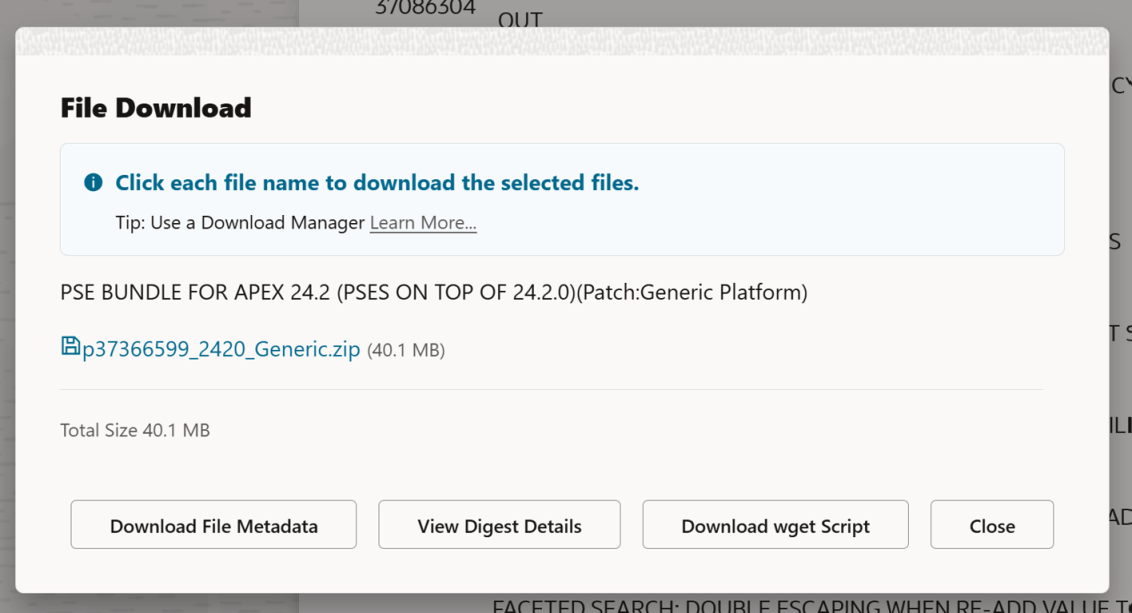
In the past, it was pretty easy to download a file from Oracle Support using the provided wget.sh script when clicking the Download button on a patch. The Download wget Script button above would have given you everything you need to download (in this case, the APEX 24.2 latest update), a patch. You’d copy that wget file to your server, run it, and your patch would magically appear on your server.

Recently, Oracle decided to require an access token in addition to the wget.sh script to download files. However, the wget.sh script doesn’t give you any indication of how to get that download token.

When you are logged into Oracle Support, you can get a ‘short lived’ download token that will make everything work. The trick is to use this URL to get it:

https://updates.oracle.com/Orion/GenToken/get_token
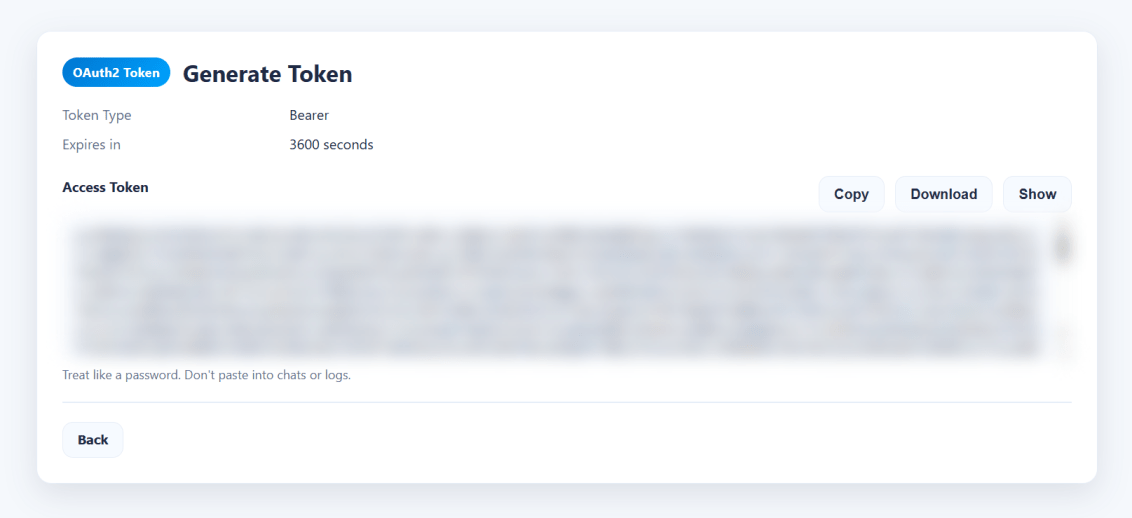
Now, on your server, you can copy the token into a token.txt file and then tell the wget.sh script where that file is using the -T argument, or you could just paste the whole key directly into the command line using the -t argument.

What you’ll see if you do it the old way

[oracle@databaseserver DB:my26con /usr/local/src/oracle/apex/24.2]
$ vim wget.sh
[oracle@databaseserver DB:my26con /usr/local/src/oracle/apex/24.2]
$ chmod u+x wget.sh
[oracle@databaseserver DB:my26con /usr/local/src/oracle/apex/24.2]
$ ./wget.sh
INFO: Output dir not specified, defaulting to current directory.
ERROR: Missing token. Provide -t <token> OR -T <token_file>.

wget.sh Help?

So, let’s see if we can get some help… Despite the ERROR: Unknown option: -help message, we do get some kind of output… But we DON’T get the necessary URL to get a token from Oracle Support.

[oracle@databaseserver DB:my26con /usr/local/src/oracle/apex/24.2]
$ ./wget.sh help
INFO: Output dir not specified, defaulting to current directory.
ERROR: Missing token. Provide -t <token> OR -T <token_file>.
[oracle@databaseserver DB:my26con /usr/local/src/oracle/apex/24.2]
$ ./wget.sh -help
ERROR: Unknown option: -help
Usage: wget.sh [options]
MODES (choose exactly one):
Single download:
-d <url> Protected download URL
[-O <file>] Output filename (optional; derived from patch_file or URL basename)
[-W <password>] Patch password (optional; appends &patch_password=<pwd>)
Batch download:
-f <file> Batch file lines: URL[,PATCH_PASSWORD]
(password optional; only for password-protected patches)
Output filename derived from patch_file=... (preferred) else URL basename.
Lines starting with '#' are ignored.
Auto-batch (no -d and no -f):
Script auto-creates a batch file in output dir and uses it.
Intended for Download UI placeholder replacement.
MANDATORY:
-t <token> Access token string (choose one of -t or -T)
-T <file> Read access token from file (first non-empty, non-# line)
OPTIONAL:
-p <dir> Output directory (default: current directory)
-P <n> Parallel downloads (default: 10 for batch, else 1)
-L <file> Log file path (if set, output is written only to this file)
-h Help
INTERNAL / HIDDEN:
-C <file> Custom CA cert bundle path
-k Disable TLS verification (insecure)
AUTH BEHAVIOR:
- Preflight: If the token is invalid/expired (HTTP 401/403) before starting, exit immediately.
- Mid-run: If a download hits 401/403, stop scheduling NEW downloads, but allow already-running ones to finish.
- End summary prints which patches succeeded/failed/skipped.
ZIP VALIDATION (DEFERRED):
- ZIP validation runs AFTER all downloads complete.
- Before validating each file, a debug line is printed.
- Uses: zip -T <file> if zip is available.
- If zip is missing, validation is skipped and user must validate manually.
NOTES:
- Non-interactive: missing required params => exits before downloading.
- Token is never echoed (unless you set DEBUG_ECHO_TOKEN=1).

Putting the token into a file

If you use the get token URL, you can just copy the contents into a file and pass it along on the command line using the capital T argument.

[oracle@databaseserver DB:my26con /usr/local/src/oracle/apex/24.2]
$ vim token.txt
[oracle@databaseserver DB:my26con /usr/local/src/oracle/apex/24.2]
$ cat token.txt
eyJ4NXQjUzI1NiI6InVMYjc0...[SNIP]
[oracle@databaseserver DB:my26con /usr/local/src/oracle/apex/24.2]
$./wget.sh -T token.txt

Final “Issues”

For me, there was another issue (bug?) in that when I ran the above command, my terminal window suddenly just closed. When I created a new terminal shell and changed back into my download directory, the files were there. To get the output (I was curious), I redirected the output into a file like so:

[oracle@databaseserver DB:my26con /usr/local/src/oracle/apex/24.2]
$ ./wget.sh -T token.txt >> output.txt
[oracle@databaseserver DB:my26con /usr/local/src/oracle/apex/24.2]
$ cat output.txt
=== OAuth start URL (manual login/token generation) ===
https://updates.oracle.com/Orion/GenToken/get_token
=== Starting downloads ===
Mode : batch (-f or auto)
Output dir : .
Parallel : 10
Count : 1
TLS verify : enabled
1 starting download for p37366599_2420_Generic.zip
-> p37366599_2420_Generic.zip
[p37366599_2420_Generic.zip] --2026-06-08 18:28:40-- https://updates.oracle.com/Orion/Services/download/p37366599_2420_Generic.zip?aru=28706611&patch_file=p37366599_2420_Generic.zip
[p37366599_2420_Generic.zip] Resolving updates.oracle.com (updates.oracle.com)... 23.199.184.196, 2600:1404:1200:e8a::4425, 2600:1404:1200:e83::4425, ...
[p37366599_2420_Generic.zip] Connecting to updates.oracle.com (updates.oracle.com)|23.199.184.196|:443... connected.
[p37366599_2420_Generic.zip] HTTP request sent, awaiting response...
[p37366599_2420_Generic.zip] HTTP/1.1 302 Moved Temporarily
[p37366599_2420_Generic.zip] Content-Type: text/html
[p37366599_2420_Generic.zip] Content-Length: 0
[p37366599_2420_Generic.zip] X-Content-Type-Options: nosniff
[p37366599_2420_Generic.zip] X-XSS-Protection: 1; mode=block
[p37366599_2420_Generic.zip] Strict-Transport-Security: max-age=432000
[p37366599_2420_Generic.zip] X-Frame-Options: sameorigin
[p37366599_2420_Generic.zip] Content-Security-Policy: default-src https: data: 'unsafe-inline' 'unsafe-eval'; frame-ancestors 'self'
[p37366599_2420_Generic.zip] Location: https://aru-akam.oracle.com/adcarurepos/vol/patch47/PLATFORM/Generic/R600000000217664/p37366599_2420_Generic.zip?FilePath=/adcarurepos/vol/patch47/PLATFORM/Generic/R600000000217664/p37366599_2420_Generic.zip&File=p37366599_2420_Generic.zip&params=c0VDZmlhSDZlVE5SNkJIVmN2VjhLdzphcnU9Mjg3MDY2MTEmZW1haWw9cmljaGFyZC5zb3VsZUBnbWFpbC5jb20mZmlsZV9pZD0xMTk4MDY0OTgmcGF0Y2hfZmlsZT1wMzczNjY1OTlfMjQyMF9HZW5lcmljLnppcCZ1c2VyaWQ9Ty1SSUNIQVJELlNPVUxFQEdNQUlMLkNPTSZzaXplPTQyMDE1NDY1JmNvbnRleHQ9QUAxMCtIQHBoeHBhYXJ1bHByZG10MDIubXRwcm9kYWVwaHgucHJvZGFwcHBoeGFldjEub3JhY2xldmNuLmNvbStQQCZkb3dubG9hZF9pZD00OTcxNzQ2MDM@&AuthParam=1780961442_2fe53a93363da4907d4609ca36ef4487
[p37366599_2420_Generic.zip] Cache-Control: max-age=3600
[p37366599_2420_Generic.zip] Expires: Tue, 09 Jun 2026 00:28:42 GMT
[p37366599_2420_Generic.zip] Date: Mon, 08 Jun 2026 23:28:42 GMT
[p37366599_2420_Generic.zip] Connection: keep-alive
[p37366599_2420_Generic.zip] Set-Cookie: ARU_LANG=US; domain=updates.oracle.com; path=/; expires=Thu, 05 Jun 2036 23:28:40 GMT
[p37366599_2420_Generic.zip] Set-Cookie: Oracle_updates_auth=NzkzNTk4NjQ4MGI3ZmZjMjVhOWEyMmUxY2U4YmJmMjUtNTM2MTZjNzQ2NTY0NWY1ZmU4OTExZWYyOTZiZjI1MzYwZGM5YjkwMDY4ZjZhMzk0MTA4ZjBkMGE3NmM3NWQwNzE0ZjgxNTBhMDc2ZjZlOTI5NTVjNmNmNzZkYTk4NWYxMTFmYTc4NjU1OGFlZDQwZGU1ZDI4NzJkNDAyYmMyZDVhMTU2ZjU1ZTEwNjM3ZmIyMmNlMjdlNzM3MjBlNzJhZGMyYjhkMmNkMDliMzJlNWU; domain=updates.oracle.com; path=/; expires=Tue, 09 Jun 2026 11:28:42 GMT
[p37366599_2420_Generic.zip] Set-Cookie: X-Oracle-BMC-LBS-Route=4318f3ca3592793473f65c871badd0ccbf53ad372ebd5c754f16f4c54ec7cf3a79b8d7e82d899bde; domain=updates.oracle.com; path=/; expires=Thu, 05 Jun 2036 23:28:40 GMT
[p37366599_2420_Generic.zip] Set-Cookie: X-Oracle-BMC-LBS-Route=4318f3ca3592793473f65c871badd0ccbf53ad3727d543e6b7f283220e2573bdc773da0f4d701470; domain=updates.oracle.com; path=/; expires=Tue, 09 Jun 2026 11:28:42 GMT
[p37366599_2420_Generic.zip] Akamai-GRN: 0.8af92917.1780961320.55c1232d
[p37366599_2420_Generic.zip] Location: https://aru-akam.oracle.com/adcarurepos/vol/patch47/PLATFORM/Generic/R600000000217664/p37366599_2420_Generic.zip?FilePath=/adcarurepos/vol/patch47/PLATFORM/Generic/R600000000217664/p37366599_2420_Generic.zip&File=p37366599_2420_Generic.zip&params=c0VDZmlhSDZlVE5SNkJIVmN2VjhLdzphcnU9Mjg3MDY2MTEmZW1haWw9cmljaGFyZC5zb3VsZUBnbWFpbC5jb20mZmlsZV9pZD0xMTk4MDY0OTgmcGF0Y2hfZmlsZT1wMzczNjY1OTlfMjQyMF9HZW5lcmljLnppcCZ1c2VyaWQ9Ty1SSUNIQVJELlNPVUxFQEdNQUlMLkNPTSZzaXplPTQyMDE1NDY1JmNvbnRleHQ9QUAxMCtIQHBoeHBhYXJ1bHByZG10MDIubXRwcm9kYWVwaHgucHJvZGFwcHBoeGFldjEub3JhY2xldmNuLmNvbStQQCZkb3dubG9hZF9pZD00OTcxNzQ2MDM@&AuthParam=1780961442_2fe53a93363da4907d4609ca36ef4487 [following]
[p37366599_2420_Generic.zip] --2026-06-08 18:28:42-- https://aru-akam.oracle.com/adcarurepos/vol/patch47/PLATFORM/Generic/R600000000217664/p37366599_2420_Generic.zip?FilePath=/adcarurepos/vol/patch47/PLATFORM/Generic/R600000000217664/p37366599_2420_Generic.zip&File=p37366599_2420_Generic.zip&params=c0VDZmlhSDZlVE5SNkJIVmN2VjhLdzphcnU9Mjg3MDY2MTEmZW1haWw9cmljaGFyZC5zb3VsZUBnbWFpbC5jb20mZmlsZV9pZD0xMTk4MDY0OTgmcGF0Y2hfZmlsZT1wMzczNjY1OTlfMjQyMF9HZW5lcmljLnppcCZ1c2VyaWQ9Ty1SSUNIQVJELlNPVUxFQEdNQUlMLkNPTSZzaXplPTQyMDE1NDY1JmNvbnRleHQ9QUAxMCtIQHBoeHBhYXJ1bHByZG10MDIubXRwcm9kYWVwaHgucHJvZGFwcHBoeGFldjEub3JhY2xldmNuLmNvbStQQCZkb3dubG9hZF9pZD00OTcxNzQ2MDM@&AuthParam=1780961442_2fe53a93363da4907d4609ca36ef4487
[p37366599_2420_Generic.zip] Resolving aru-akam.oracle.com (aru-akam.oracle.com)... 184.29.30.115
[p37366599_2420_Generic.zip] Connecting to aru-akam.oracle.com (aru-akam.oracle.com)|184.29.30.115|:443... connected.
[p37366599_2420_Generic.zip] HTTP request sent, awaiting response...
[p37366599_2420_Generic.zip] HTTP/1.1 200 OK
[p37366599_2420_Generic.zip] Accept-Ranges: bytes
[p37366599_2420_Generic.zip] Content-Type: application/zip
[p37366599_2420_Generic.zip] ETag: "cb62b54e645a014b6573f97ab03daad6:1777541856.446518"
[p37366599_2420_Generic.zip] Last-Modified: Thu, 30 Apr 2026 09:37:37 GMT
[p37366599_2420_Generic.zip] Server: AkamaiNetStorage
[p37366599_2420_Generic.zip] Content-Length: 42015465
[p37366599_2420_Generic.zip] Date: Mon, 08 Jun 2026 23:28:42 GMT
[p37366599_2420_Generic.zip] Connection: keep-alive
[p37366599_2420_Generic.zip] Length: 42015465 (40M) [application/zip]
[p37366599_2420_Generic.zip] Saving to: ‘./p37366599_2420_Generic.zip’
[p37366599_2420_Generic.zip]
[p37366599_2420_Generic.zip] 0K ........ ........ ........ ........ 79% 42.7M 0s
[p37366599_2420_Generic.zip] 32768K ........ 100% 50.1M=0.9s
[p37366599_2420_Generic.zip]
[p37366599_2420_Generic.zip] 2026-06-08 18:28:43 (44.0 MB/s) - ‘./p37366599_2420_Generic.zip’ saved [42015465/42015465]
[p37366599_2420_Generic.zip]
=== ZIP validation pass (post-download) ===
[ZIP-VALIDATE] Preparing to validate: p37366599_2420_Generic.zip
[ZIP-VALIDATE] OK: p37366599_2420_Generic.zip
=== Summary ===
Succeeded downloads:
✅ p37366599_2420_Generic.zip
Failed downloads:
(none)
Skipped / Not started downloads:
(none)
ZIP validation:
OK:
✅ p37366599_2420_Generic.zip
FAILED:
(none)
SKIPPED:
(none)
Totals:
downloads: succeeded=1, failed=0, skipped=0, total=1
zip-test : ok=1, failed=0, skipped=0
Result: All downloads completed successfully.

Interestingly, Johannes Michler appears to have the only other post about this issue. He fixed it by making his own custom download script which you can paste the download URL into and then put your Oracle Support password into a prompt. That also works, but this is the way Oracle Support thinks you should do it.


Finding Unindexed Foreign Keys in Oracle, now with EVEN BETTER index creation DDL!

It all started here: https://carsandcode.com/2023/07/27/finding-unindexed-foreign-keys-in-oracle/

It got better here: https://carsandcode.com/2023/09/01/finding-unindexed-foreign-keys-in-oracle-now-with-index-creation-ddl/

But now, it’s even better!

Changes:

  • A comment section at the front.
  • Formatting changes.
  • Better table aliases.
  • Indexes are now owned by the table owner rather than the DBA running the script.
  • All missing indexes are created in a single tablespace named “missing_foreign_key_indexes”. Obviously, this tablespace needs to exist for the statements to work. You might want to change this clause to use “your user’s index tablespaces”, and you should drop this if you are on Oracle Autonomous on Oracle Cloud, since you only get one tablespace for your stuff and everything will automatically go to it.
  • There are suggestions for making shorter index names if needed/wanted.
  • The “local” clause was added for partitioned tables.
  • You can optionally require validated foreign keys, valid indexes, and visible indexes. Today’s invalid or invisible index can turn into tomorrow’s index, so I left the default to show all indexes.
  • We are now sorting numerically.
  • Change “select *” into “select username” for the not in clause that eliminates users.
  • Added a where clause to find missing indexes by default.

Again, here’s the formatted code that doesn’t look great, but if you copy it, it should be formatted as it is in the above picture.

-- Created by Rich Soule of Talan's Oracle Group in collaboration with Lance Eaton.
-- 
-- Notes:
--   * Can ignore unusable/invisible/bitmap indexes; prefers NORMAL (and function-based NORMAL) b-trees
--   * Emits LOCAL for partitioned child tables
--   * change 'missing_foreign_key_indexes' tablespace to taste (or drop on Autonomous)
--   * if you want to shorten the index names, you can replace the two lines with comments below with something like: 'missing_fk_index'||rownum
--   * designed to be run by a DBA with access to the DBA views, but can also be run by a regular user by replacing the dba_ views with 
--     all_ views or user_ views (search and replace dba_ with all_ or user_)

    with owner_exclusion_list as (   select username from dba_users where oracle_maintained = 'Y'
                           union all select 'ORDS_METADATA'    from dual
                           union all select 'ORDS_PUBLIC_USER' from dual )
       , constraint_column_list as ( select owner
                                          , table_name
                                          , constraint_name
                                          , listagg(column_name, ', ') within group (order by position) as constraint_column_list
                                       from dba_cons_columns
                                       join dba_constraints using (owner, table_name, constraint_name)
                                      where constraint_type = 'R'
                                        and status = 'ENABLED'
                                     -- and validated = 'VALIDATED' -- uncomment to require validated fks
                                        and owner not in (select username from owner_exclusion_list)
                                   group by owner, table_name, constraint_name )
       , index_column_list as (      select di.owner
                                          , di.table_name
                                          , di.index_name
                                          , listagg(dic.column_name, ', ') within group (order by dic.column_position) as index_column_list
                                       from dba_indexes di
                                       join dba_ind_columns dic on (dic.index_owner = di.owner and dic.index_name  = di.index_name)
                                      where di.owner not in (select username from owner_exclusion_list)
                                     -- and di.status     = 'VALID'   -- uncomment to require valid indexes
                                     -- and di.visibility = 'VISIBLE' -- uncomment to require visible indexes
                                        and di.index_type in ('NORMAL','FUNCTION-BASED NORMAL')
                                   group by di.owner, di.table_name, di.index_name )
       , foreign_key_index_query as (select decode(icl.table_name, null, 'Missing', 'Exists')                      as index_existence
                                          , dt.num_rows                                                            as last_analyzed_row_count_number
                                          , to_char(dt.num_rows, '999,999,999,999,999')                            as last_analyzed_row_count 
                                          , dt.last_analyzed           
                                          , ccl.owner                                                              as table_owner
                                          , ccl.table_name           
                                          , ccl.constraint_name                                                    as foreign_key_name
                                          , ccl.constraint_column_list                                             as foreign_key_column_list
                                          , coalesce(icl.index_name,        '*** Missing Index ***')               as index_name 
                                          , coalesce(icl.index_column_list, '*** Missing Index ***')               as index_column_list
                                          , decode(icl.table_name, null,'create index "'||ccl.owner||'".'||
                                                                        lower(ccl.table_name||'_foreign_key_index_on_'|| -- Shorten these two lines to have
                                                                        replace(replace(ccl.constraint_column_list,',','_'),' '))|| -- smaller index names
                                                                        ' on "'||ccl.owner||'"."'||ccl.table_name||'"('||
                                                                        replace(replace(ccl.constraint_column_list,',','","'),' ')||')'||
                                                                        decode(dt.partitioned, 'YES', ' local', '')||
                                                                        ' tablespace missing_foreign_key_indexes;'
                                                                       ,'*** supporting index already exists ***') as create_index_ddl
                                       from constraint_column_list ccl
                                       join dba_tables dt on (dt.owner = ccl.owner and dt.table_name = ccl.table_name)
                                  left join index_column_list icl on (     icl.owner = ccl.owner and icl.table_name = ccl.table_name
                                                                       and icl.index_column_list like ccl.constraint_column_list || '%' ))
  select index_existence
       , last_analyzed_row_count
       , last_analyzed
       , table_owner
       , table_name
       , foreign_key_name
       , foreign_key_column_list
       , index_name
       , index_column_list
       , create_index_ddl
    from foreign_key_index_query
   where index_existence = 'Missing'  -- comment to see both Exists & Missing
order by last_analyzed_row_count_number desc nulls last, table_owner, table_name, foreign_key_column_list;

Too many audit logs? xargs to the rescue!

After watching a client pipe the results of a find command into a text file, and then edit the text file to add rm in front of each line and then turn the text file into a script and run it… I knew I needed to add this here.

Sometimes you have too many audit logs and rm *.aud returns the following:

-bash: /bin/rm: Argument list too long

If so, we can use xargs to remove them all:

find . -type f -name '*.aud' | xargs rm

Happy Linux’ing.


Command line editing with bash

I use Oracle Linux just about every day. I teach Oracle classes using Oracle Linux and work with a whole bunch of Oracle servers which, more often than not, use Oracle Linux (or sometimes Redhat Linux which is basically very similar to Oracle Linux). The vast majority of the time these systems are set up to use bash (From wikipedia: The name itself is an acronym, a pun, and a description. As an acronym, it stands for Bourne-again shell, referring to its objective as a free replacement for the Bourne shell. As a pun, it expressed that objective in a phrase that sounds similar to born again, a term for spiritual rebirth. The name is also descriptive of what it did, bashing together the features of sh, csh, and ksh.) as the default shell for users.

While teaching my classes, I frequently type commands while my students watch and it’s not unusual for me to make typing mistakes. I often bang the BACKSPACE key a bunch of times while removing a single word, or worse yet, I hold it down to erase and entire line and start all over again. Every time I did this I would think “I used to know how to do this better.”

Today I looked it up a book that I have sitting on my bookshelf, (I last read it in 1995), which I would highly recommend if you’re a Unix System Admin: Using csh & tcsh Type Less, Accomplish More. It’s a really great book if you are going to be using a Unix shell all day every day interactively. I read it way back when I was learning Unix and it made a huge difference in my productivity with interactive ‘shelling’. These days I’m mostly only working with Linux to get Oracle systems set up and configured correctly, so I’m usually sticking with the default shell… which is bash.

I tested out some of the things in the book and they work a bit differently in tcsh than they do in bash. Since I’ve become (largely by default) a bash user, here goes:

Remove the entire command line in bash with CTRL-u or CTLR-w

[oracle@multitenant ~]$ This is a command line that I want to erase

Type CTRL-u or CTRL-w (as an aside, CTRL-w in tcsh erases a single word) and voila:

[oracle@multitenant ~]$

Sometime I only mess up the last word…

Remove the last word typed in bash with ESC BACKSPACE

[oracle@multitenant ~]$ env | grep ORALCE

Oops! Messed up that ORACLE. Type ESC BACKSPACE and voila:

[oracle@multitenant ~]$ env | grep

Now I can correctly add ORACLE to the above without having to use backspace six times.

Reuse part of the previous commands arguments with !$, !^, !*

Often we’ll look at the contents of a file and then decide we want to edit it.

[oracle@multitenant ~]# cat /etc/oratab

Hmmm…. I see something I want to change, so rather than typing vi /etc/oratab I can just do the following:

[oracle@multitenant ~]# vi !$

!$ uses the last argument from the previous command, !^ uses the first argument from the previous command, and !* uses all arguments from the last command, so actually any of those would have worked in the example above. Remember that above I have two parts in the line I’m typing; The first is the actual command (cat) and then the second is the argument (/etc/oratab).

Hopefully this (along with the CTRL-r post from earlier) will help a few folks become just a bit more efficient in their day to day operations!